Add WebP files to shrink them, or JPG and PNG files to convert them — the output is already set to WebP. Lower the quality slider for smaller files, or use Max file size for an exact KB limit.
WebP is the best general-purpose format for websites: our test photo was 409 KB as WebP and 520 KB as JPG at quality 75, and WebP keeps transparency like PNG. Everything runs on your device — nothing is uploaded.
🔥
Your savings so far: 0 photos · 0 KB saved
🌍0 photos compressed worldwide · 0 MB saved
Drop photos here, or click to choose
Batch-compress, resize, crop, rotate, watermark, and convert formats — right in this tab.
JPEG · PNG · WebP · HEIC · AVIF (where supported) — your photos never leave this browser tab
No photos yet
Nothing here yet — add photos above to get started.
Works on a plain, single-colour background only.
Upload a photo
You'll crop it to the exact aspect ratio next.
0/0
Deterministic checks
Size, resolution, format and file size.
Printable sheet
WebP vs JPG at the same quality (measured)
A 2250×1500 landscape photo, 2.82 MB as a camera JPEG, saved at matching quality settings:
WebP versus JPEG file size
Quality
JPEG
WebP
WebP saves
75
520 KB
409 KB
21%
60
374 KB
314 KB
16%
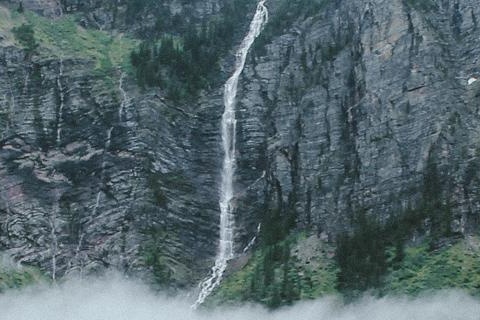
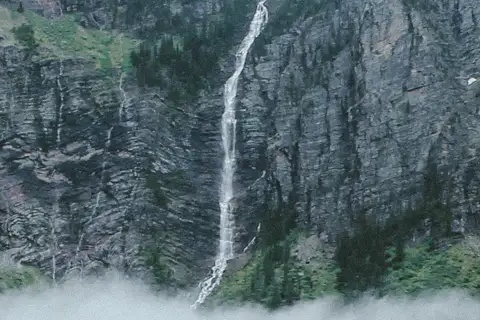
JPEG quality 75 — 520 KBWebP quality 75 — 409 KB
Test photo: “Mountains around Avalanche Lake” by Linh Pham (CC0, via Unsplash). Sizes measured 2026-11-04 with this site's own encoder in Edge; other browsers produce slightly different sizes. Crops show the same 480×320 px region at 100%.
How to compress a WebP file
Tap the box above (or drag and drop) to add one or more WebP files.
Check the output format and quality in the settings panel, or switch to Max file size for a KB limit.
Tap Process all — the new size and the percentage saved appear under each photo.
Download each file, or the whole batch as one ZIP.
Frequently asked questions
What WebP quality should I use?
70–80 for photos on websites; 85–90 if you need near-perfect detail. Screenshots and graphics compress well at 80.
Does every browser support WebP?
All current browsers display WebP. Creating WebP needs a browser that can encode it — Chrome, Edge and Firefox can; if yours can't, the option is greyed out in the format list.
Where should I not use WebP?
Government forms, some email clients and older software often only accept JPG or PNG — keep a JPG copy for those.
Can WebP be transparent?
Yes — like PNG, and usually much smaller.
Related tools
Adjust photo
Redact / blur
Draw a box over anything you want permanently pixelated — a face, a plate, a document. No detection, just what you draw.